# 修改系统用户名为英文
**WIN+R 输入CMD 回车**
**查看是否中文路径**
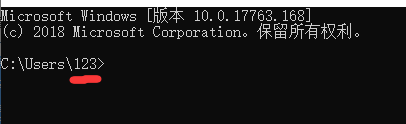 **如果你上图中"123"的位置是中文的话**
**下面是修改方法:**
**新建一个系统账户用户名为英文**
> **【权限要有管理员】【权限要有管理员】【权限要有管理员】**
**然后用这个账户就行了**
**换账户桌面东西没得话,打开此电脑 里面东西都在。把他发送快捷方式 发到现在这个账户里来就行了**
**文字教程:**
**视频教程:**
---
# Agent Instructions: Querying This Documentation
If you need additional information that is not directly available in this page, you can query the documentation dynamically by asking a question.
Perform an HTTP GET request on the current page URL with the `ask` query parameter:
```
GET https://wiki.apns.top/qi-ta-jiao-cheng/ke-ji-za-yi-jiao-cheng/xiu-gai-xi-tong-yong-hu-ming-wei-ying-wen.md?ask=
```
The question should be specific, self-contained, and written in natural language.
The response will contain a direct answer to the question and relevant excerpts and sources from the documentation.
Use this mechanism when the answer is not explicitly present in the current page, you need clarification or additional context, or you want to retrieve related documentation sections.
**如果你上图中"123"的位置是中文的话**
**下面是修改方法:**
**新建一个系统账户用户名为英文**
> **【权限要有管理员】【权限要有管理员】【权限要有管理员】**
**然后用这个账户就行了**
**换账户桌面东西没得话,打开此电脑 里面东西都在。把他发送快捷方式 发到现在这个账户里来就行了**
**文字教程:**
**视频教程:**
---
# Agent Instructions: Querying This Documentation
If you need additional information that is not directly available in this page, you can query the documentation dynamically by asking a question.
Perform an HTTP GET request on the current page URL with the `ask` query parameter:
```
GET https://wiki.apns.top/qi-ta-jiao-cheng/ke-ji-za-yi-jiao-cheng/xiu-gai-xi-tong-yong-hu-ming-wei-ying-wen.md?ask=
```
The question should be specific, self-contained, and written in natural language.
The response will contain a direct answer to the question and relevant excerpts and sources from the documentation.
Use this mechanism when the answer is not explicitly present in the current page, you need clarification or additional context, or you want to retrieve related documentation sections.